
Login

  • Contact
Breakdesigns logo
  • Home
  • Extensions
    • Joomla Extensions
      • Custom Filters
      • Custom Fields For All
      • Product Bundles
      • Dependent Custom Fields For All
      • Stockable Custom Fields
      • Product Builder
  • Pricing
  • Downloads
  • Support

Create the sub-custom fields

The plugin uses other custom fields for the variations.
So you first have to create those custom fields. These custom fields will be named sub-custom fields from now on.

Go to Virtuemart > Custom Fields and press New to create a new custom field.

As type select String or Plug-ins (if you have compatible plug-ins). 
Set Cart Attribute > No and Cart Input > No
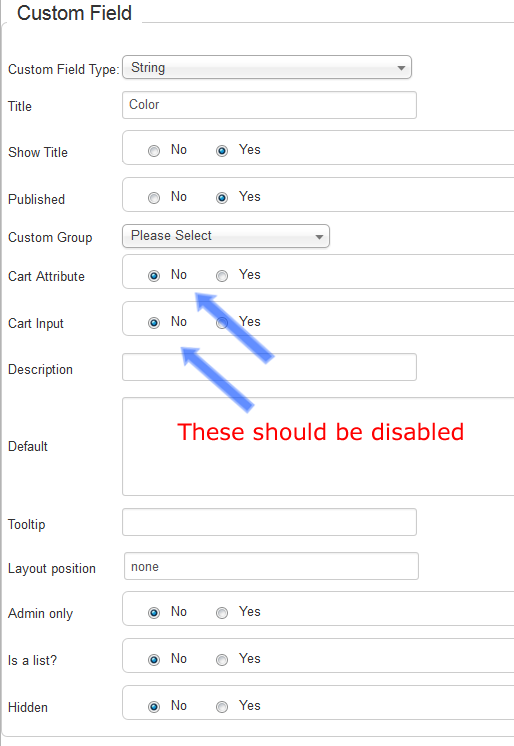
custom

The above describes the general settings of custom fields. In case you are using plugins for the sub-custom fields, please check your plugin's manual, for it's usage.
If you are using Custom Fields For All, you can find the relevant documentation here.

Save and create the next one.
Create as many custom fields as you need.

NUMBERS THAT MAKE US PROUD!

  • 12,000+ businesses rely on our solutions.
  • 100,000+ downloads of our extensions.

Break Designs

  • About
  • Contact us
  • Support
  • Terms of service
  • Privacy Policy

Premium Extensions

  • Custom Filters
  • Custom Fields for all
  • Product Builder
  • Product Bundles

Follow us

Cookies Consent

This website uses cookies to manage authentication, navigation, and other functions. By using our website, you agree that we can place these types of cookies on your device.

View Privacy Policy

View e-Privacy Directive Documents

View GDPR Documents

You have declined cookies. This decision can be reversed.

You have allowed cookies to be placed on your computer. This decision can be reversed.

Copyright © 2026 Breakdesigns company. All Legal Rights Reserved.
  • Home
  • Extensions
    • Joomla Extensions
      • Custom Filters
      • Custom Fields For All
      • Product Bundles
      • Dependent Custom Fields For All
      • Stockable Custom Fields
      • Product Builder
  • Pricing
  • Downloads
  • Support